
AnkiDroid Flashcards
AnkiDroid Open Source TeamEducation
4.75.69K Reviews
- Version
- Varies With Device
- Installs
- 10.00M
- Age Rating
- Everyone
Screenshots
Our Review of AnkiDroid Flashcards
 Analysis by Appyee
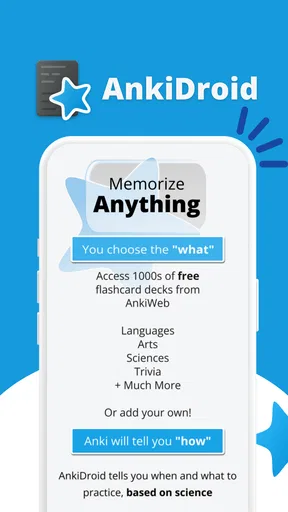
I use flashcards when I need to remember something that ordinary reading refuses to make stick, and AnkiDroid Flashcards has become one of the more serious options I have tried for that job. It is a free education app from the AnkiDroid Open Source Team, designed around repeated recall rather than passive review. That distinction matters: the app does not simply show me a list of notes and hope I reread them. It asks me to retrieve an answer, judge how well I remembered it, and continue with a schedule shaped by those responses.
That approach makes it useful for language vocabulary, medical terminology, exam preparation, geography, music theory, professional training, and small facts I want to retain over a long period. It is also more demanding than a typical quiz app. I have to create or import useful material, understand the review controls, and accept that progress comes from regular sessions rather than occasional bursts of enthusiasm.
The app has a strong public reputation, with a 4.8 average from around 164 thousand ratings and more than 10 million installs. Those figures fit my impression of it as a mature tool rather than a novelty. Still, popularity does not make every part of the experience effortless. Its greatest strength is control, while its main weakness is that control can feel like work for someone who wants instant, polished lessons.
How AnkiDroid works when readability and navigation matter
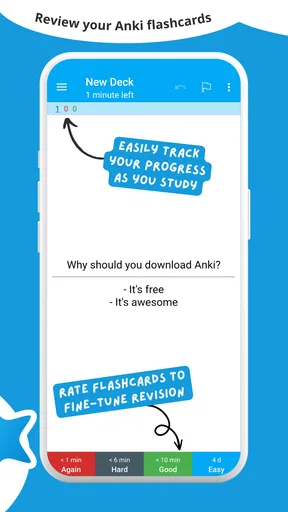
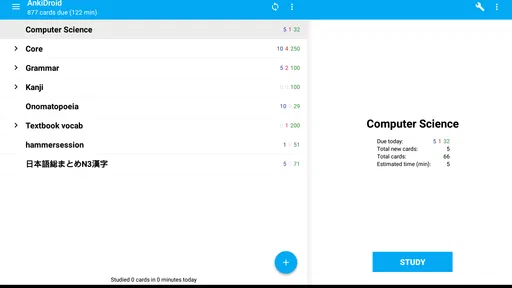
The central experience is built around decks, cards, and scheduled reviews. A deck is a collection of cards, while each card presents a prompt and an answer in a way that encourages active recall. After answering, I choose how difficult the card felt or how well I remembered it. The app then uses that feedback to decide when the card should return.
This structure is easy to understand once I have completed a few reviews, but the surrounding options can initially feel dense. AnkiDroid is not arranged like a simple three-button learning game. Deck management, card editing, study settings, browsing, and scheduling all expose more control than many casual learners expect. I appreciate that depth when I am building a serious study system, although a first-time user may need patience before the interface feels natural.
Readability depends heavily on the deck itself. A well-made deck with short prompts, clear contrast, and sensible spacing is comfortable to use. A badly designed deck can be tiring even if the app is functioning perfectly. This is an important distinction: AnkiDroid gives me tools to study content, but it cannot automatically turn cluttered cards into readable ones.
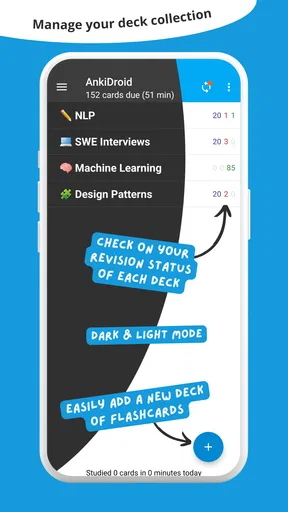
I find navigation easier when I keep my collection organized from the start. I use separate decks or subgroups for distinct subjects instead of putting every topic into one enormous pile. That makes it simpler to begin a focused session, identify neglected material, and avoid the feeling that the app is presenting an endless wall of unrelated questions.
The browser is particularly valuable for maintenance. When a card repeatedly causes trouble, I can inspect it rather than blindly pressing through the schedule. I might discover that the question contains two facts, the wording gives away the answer, or the back of the card includes too much information. Editing the card at that point is often more effective than merely reviewing it again.
One practical habit improves readability more than people expect: I write prompts that ask for one answer at a time. Instead of putting “Explain everything about the French Revolution” on the front, I break the material into smaller questions. This reduces mental overload and makes the review buttons more meaningful, because I am judging one memory rather than a vague impression of a large topic.
Pre-built decks can make the first step easier, especially for someone learning a language or exploring a familiar academic subject. They also introduce a quality trade-off. A ready-made deck saves time, but I may inherit unfamiliar wording, unnecessary cards, or formatting that does not suit my way of reading. I treat shared material as a starting point, not as a guarantee that every card deserves a place in my daily queue.
Small interface choices that help during repeated study
Repeated review is where the app’s design becomes more meaningful. I do not need to search for the same material each day; scheduled cards come forward based on previous responses. That removes one common obstacle in studying: deciding what to revise. The trade-off is that the schedule can feel strict when I have missed several days and return to a larger workload.
I also like separating learning from card creation. When I am tired, I focus on answering the cards already due instead of stopping to redesign my collection. At another time, I can browse difficult cards and improve them with a clearer prompt. Keeping those activities separate prevents a study session from turning into an unplanned editing project.
For people who find dense screens difficult, the most useful improvement may not be a hidden setting but better card authoring. Short lines, consistent punctuation, one concept per card, and restrained use of emphasis make a noticeable difference. I avoid placing long paragraphs on the front and try to keep the answer visually predictable. This benefits anyone who reads slowly, studies on a small screen, or loses focus when too much information appears at once.
Motor, sensory, and situational access in everyday use
Flashcards can suit different physical and sensory needs because the basic task is compact: read a prompt, recall an answer, reveal it, and choose a result. I can study in short bursts without needing a large workspace or a complicated sequence of screens. That makes the app practical for a commute, a waiting room, or a quiet break between other responsibilities.
At the same time, the app asks for frequent, repeated interaction. A learner with limited hand movement, tremor, joint pain, or fatigue may find repeated tapping uncomfortable, especially during a long queue. The experience is not automatically accessible simply because each individual action is small. The number of actions adds up, and the review pace can make that more noticeable.
I would approach the app by testing a short session first rather than assuming that a full study routine will be comfortable. If tapping every response is tiring, a user may prefer to explore the device’s own interaction tools or alternative input methods, provided those work with the installed setup. The important point is that AnkiDroid’s learning model remains useful only if the physical interaction is sustainable.
For sensory differences, card design again makes a major difference. Images, sound, color, and formatting can enrich a deck, but they can also create distraction or make a card harder to interpret. I prefer using media only when it contributes directly to recall. For example, an image can be valuable for identifying a plant, while decorative imagery adds visual noise without improving memory.
Audio-based cards can support pronunciation practice or learners who do not want to rely entirely on written prompts. Yet audio is not a universal solution. Someone who cannot use sound comfortably needs a text alternative, and someone studying in a noisy place may need a quiet, text-first deck. I judge each deck by whether its information is available in a form I can actually use, not by how impressive its media appears.
Color deserves similar caution. If a card uses color to distinguish categories, I make sure the wording or layout carries the same meaning. Otherwise, a learner who cannot distinguish those colors clearly may receive a different, less useful version of the lesson. Good cards should not make color the only signal for whether an answer is correct, urgent, or related to a particular topic.
One of my favorite use cases is a small professional vocabulary deck. I can add a term after encountering it at work, write a plain-language definition, and include one example that reflects my actual task. Later, the app presents the term in manageable intervals. This is more effective for me than highlighting a definition in a document because I have to produce the meaning before seeing it.
A realistic daily routine might look like this: during a morning train ride, I complete a short set of language cards; at lunch, I add two or three terms that appeared in a lesson; in the evening, I review the cards scheduled for that day. The routine works because the sessions are divided by context. I do not need a long uninterrupted block, but I do need enough consistency for the scheduling system to remain useful.
Situational access is one of the app’s strongest qualities. It is free, so cost is not an obstacle for someone who wants to experiment with structured recall. It is also rated for Everyone, which makes it suitable for a broad age range in terms of store classification. However, “free” does not mean “effortless.” The real investment is time spent learning the workflow and maintaining cards.
Where it fits beside simpler learning alternatives
Compared with a basic notes app, AnkiDroid gives me a much better system for deciding what to revisit. Notes are excellent for storing explanations, examples, and reference material, but they do not naturally force me to retrieve information. I can combine both: keep the full explanation in my notes and use a concise flashcard to test the key idea.
Compared with a language-learning app built around guided lessons, AnkiDroid offers less hand-holding. A lesson app may provide a clear path, illustrations, progress prompts, and a sense of variety. AnkiDroid is better when I already know what I need to memorize or when I want to build a collection around a specialized subject. If I want a teacher-like sequence with grammar explanations and conversational practice, I would choose a dedicated course app and use flashcards as a supplement.
Compared with paper cards, the digital version is easier to carry, sort, revise, and schedule. Paper can feel calmer and more tactile, though, and some people remember better when physically writing and handling cards. AnkiDroid is not automatically superior for every learner; its advantage appears when automatic review timing, searchable collections, and quick editing matter more than a screen-free experience.
Compared with a quiz game, it is less entertaining but more deliberate. A game may motivate me through points, streaks, or rapid variety, while AnkiDroid asks me to spend time on cards that are personally difficult. That can feel repetitive, but the repetition is the point. I would skip it if I mainly want relaxed trivia or immediate feedback without building a study habit.
Remaining barriers before making it part of a routine
The first barrier is setup. Creating useful cards takes judgment. I need to decide what belongs on the front, what belongs on the back, and whether the answer is precise enough to grade myself honestly. Importing a deck is quicker, but it shifts the problem from creation to selection and cleanup. People who expect to open the app and receive a complete course may be disappointed.
The second barrier is the review schedule. Spaced repetition rewards regularity, but life is irregular. If I ignore reviews, the backlog can become discouraging. The app is not punishing me in a moral sense, yet the queue makes missed practice visible. I recommend starting with a modest collection rather than importing every possible deck at once. A smaller deck that I actually review is more valuable than a huge library I avoid.
Another difficulty is self-assessment. After revealing an answer, I must choose a response that reflects my memory. If I press the easiest option because I recognized the answer rather than recalled it, the schedule may move the card too far away. If I mark everything as difficult, the queue may become unnecessarily repetitive. The system can organize practice, but it cannot make that judgment for me.
Cards can also become stale. A definition may be technically correct but no longer useful in my context. A language example may sound unnatural to me, or a professional procedure may change. I need to review the material itself occasionally, not just the timing. This is one reason I prefer adding personal examples: they are easier to understand and more likely to remain relevant.
There is a mental-access barrier too. The app’s terminology and options may feel intimidating to someone who is already dealing with anxiety, attention difficulties, or limited study energy. I find that a simple routine helps: one subject, a small daily target, and no pressure to customize every setting immediately. Advanced control is valuable, but beginners should not feel obliged to understand the whole system before completing their first useful review.
Accessibility also depends on the content source. A deck with tiny details in images, unexplained abbreviations, or audio without a written equivalent may exclude learners even though the underlying app remains usable. I inspect a sample of cards before committing to a shared deck. If the format does not work for me, I either edit it or make a smaller personal version.
Privacy-conscious users should also think carefully about what they place into cards. I use the app for study material, not sensitive personal records. A flashcard can look harmless while still containing private names, workplace information, or health details. Keeping the content focused on the learning goal is a sensible boundary, particularly when importing or sharing decks.
The app is not my first choice when I need immediate collaboration, live explanation, or open-ended practice. It cannot replace a tutor for correcting a nuanced essay, a conversation partner for natural speaking, or a teacher who notices misconceptions I have not turned into cards. It is strongest as a memory layer around those activities, not as a complete education environment.
My inclusive verdict after using it as a study tool
I recommend AnkiDroid Flashcards to learners who want control over what they study and who are willing to build a repeatable habit. The free price makes experimentation easy, and the Everyone content rating broadens its appeal. Its high user response, including around 5.6 thousand written reviews, is understandable because the app solves a real problem: remembering material over time instead of repeatedly starting from the beginning.
Its inclusive potential comes from flexibility. I can make a text-only deck, keep prompts short, use personal examples, divide study into brief sessions, and choose subjects that mainstream learning apps do not cover well. Those choices can support different reading speeds, attention patterns, environments, and learning goals. The app does not force every learner into one course path.
That flexibility also creates responsibility. A learner may need to redesign cards for readability, avoid relying on color alone, provide text alongside audio, and moderate the size of the daily queue. Someone with motor or sensory needs should test the repeated interaction in a realistic session and use compatible device-level access tools where appropriate. I would not describe the experience as universally effortless, but I do find it adaptable when the learner is prepared to shape the material.
My most practical advice is to begin with a narrow goal. Make or choose a small deck, write one clear fact per card, and review it consistently before exploring advanced organization. After a week of real use, inspect the cards that feel confusing or exhausting. Often the problem is not memory; it is a vague prompt, an overloaded answer, or a format that does not match the way you read.
I would skip this app if I want polished lessons, constant novelty, or a fully guided curriculum. I would choose it when I need durable recall, specialized content, and the ability to adjust the learning material to my own circumstances. For me, that makes it a thoughtful education app rather than a quick study trick: powerful, economical, and inclusive in proportion to the care I put into its cards and routine.
Privacy and Permissions
See what permissions an app requests and how it handles your data.
- Photos/Media/Files
- read the contents of your USB storage, modify or delete the contents of your USB storage
- Storage
- read the contents of your USB storage, modify or delete the contents of your USB storage
- Camera
- take pictures and videos
- Microphone
- record audio
- Other
- view network connections, measure app storage space, full network access, change your audio settings, run at startup, control vibration, prevent device from sleeping
Verdict
Strengths of AnkiDroid Flashcards
- Spaced repetition helps retain information over the long term.
- Supports images, audio, videos, and custom card layouts.
- Deck synchronization keeps progress available across devices.
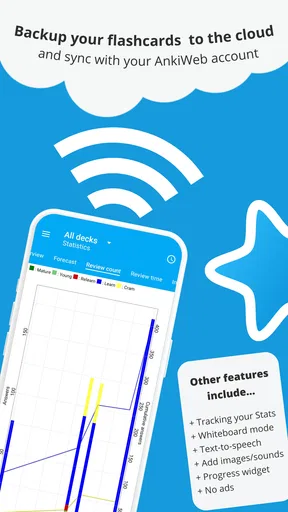
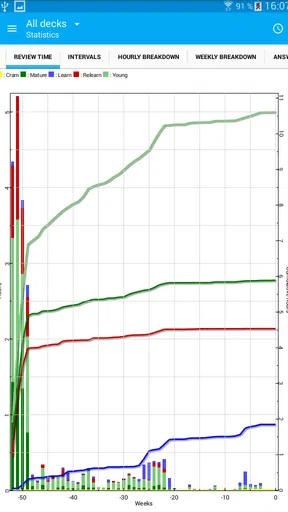
- Advanced statistics show study habits and retention trends.
- Highly customizable review settings suit different learning styles.
Limitations of AnkiDroid Flashcards
- The interface can feel dated and confusing for new users.
- Creating advanced cards may require HTML or template knowledge.
- Some shared decks contain errors or inconsistent formatting.
- Large media-heavy decks can consume considerable storage space.
- Synchronization setup may be less intuitive than in paid alternatives.
Similar Picks in This Category
View All
Duolingo: Language Lessons
Duolingo4.7

Google Classroom
Google LLC2.8

Unacademy: Learn & Crack Exams
Unacademy3.2

Bible App for Kids
Life.Church4.4

Cake - Learn English & Korean
Cake Corp.4.7

Brainly: AI Homework Helper
Brainly4.5
Frequently Asked Questions
What is AnkiDroid Flashcards, and how does it work?
AnkiDroid Flashcards is an Android app for creating, organizing, and reviewing digital flashcards. It uses spaced repetition to show cards at carefully timed intervals, helping you remember information more efficiently. You can create your own decks, edit card templates, add images or audio, and download shared decks from AnkiWeb. It is especially useful for languages, exam preparation, medical studies, and memorizing facts.
Can I synchronize my AnkiDroid cards with other devices?
Yes. AnkiDroid can synchronize your decks, review history, notes, and settings through AnkiWeb. After signing in with an AnkiWeb account, you can move between an Android phone, tablet, desktop computer, or compatible iOS app while keeping your collection updated. It is important to synchronize regularly, particularly before switching devices or making major changes, because conflicting edits can occasionally require you to choose which version to keep.
Does AnkiDroid include ready-made flashcard decks?
AnkiDroid does not provide a complete catalog of official study material, but it supports downloading shared decks from AnkiWeb and importing decks created by other users. The quality, organization, and accuracy of these decks can vary considerably, so reviewing the content before relying on it is recommended. You can also build personalized decks from scratch, which often produces better results because the cards match your own subjects and learning goals.
Is AnkiDroid free, and does it require an internet connection?
AnkiDroid is generally available as a free Android application, and its core flashcard and spaced-repetition features do not require a subscription. An internet connection is needed for tasks such as downloading shared decks, synchronizing with AnkiWeb, or accessing online media. Once your decks are stored on the device, you can normally review cards offline. Storage requirements may increase if your decks contain many images, recordings, or videos.
Is AnkiDroid suitable for beginners, and what should new users know?
AnkiDroid can be very effective for beginners, although its many settings and card-management options may feel complicated at first. New users should begin with a small deck, learn how the Again, Hard, Good, and Easy buttons affect scheduling, and avoid adding too many cards at once. Consistent daily reviews are more important than long occasional sessions. Creating clear, focused cards usually leads to better learning than copying large blocks of information.
